


VoiceMap: Audio Tours & Guides
4.7285.00 Reviews
App Specs
- Version
- 15.3.7
- Updated On
- License
- Free
- Downloads
- 100,000+
- Developer
- AudioGuide
- Categories
- Travel & Local
- Platform
- Android
Screenshots

 Analysis by AppCompare
On a first visit to a city, I like having a plan without feeling locked into a group timetable. VoiceMap: Audio Tours & Guides is built for that middle ground: it turns a route into a narrated experience you can follow at your own pace. It is a travel app from AudioGuide, and its focus is audio-led walks and drives rather than booking hotels or managing a whole itinerary. I find that distinction useful: it can enrich a day out, but it is not meant to replace maps, transit directions, or practical trip planning.
Getting Started with Ease
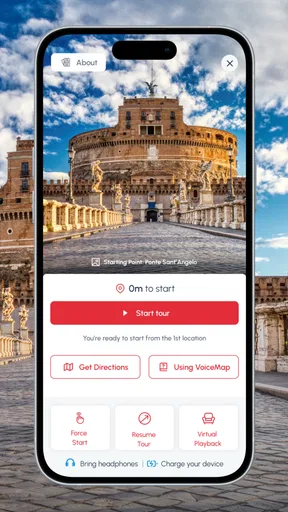
Kicking things off with VoiceMap is a breeze. The installation is straightforward, just like any other app you’ve downloaded a million times. Once it’s on your phone, you’re greeted by a clean and intuitive interface. You don’t need a degree in tech to navigate this one, trust me. The app’s design is friendly and inviting, with a focus on usability that even a tech novice would appreciate.
Choosing a tour that fits the day
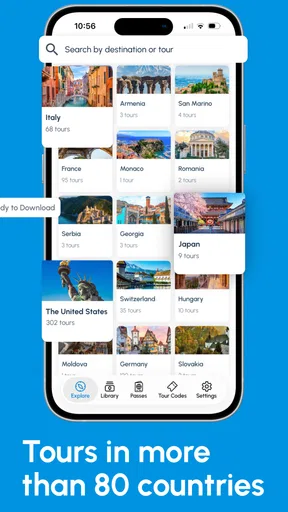
The app’s appeal depends on finding a route that matches the kind of outing you actually want. The catalog covers walks and drives in 500 cities, including familiar destinations such as London, New York, Paris, Rome, Amsterdam, and Prague. That breadth makes it worth checking before a trip, but the city count alone does not guarantee that every neighborhood or interest has a suitable tour. I’d look at the route and subject before committing, especially if I had only a short window between other plans.
For a relaxed first outing, I’d choose a walk that starts near somewhere I already expect to visit. That makes it easy to fit the tour into a day rather than building the whole day around it. A driver may find a narrated route useful for seeing more ground, but should treat the experience as something to prepare before setting off: handling a phone while driving is not a sensible trade-off, and a passenger is better placed to manage the app and listen for directions.
Exploring the Features
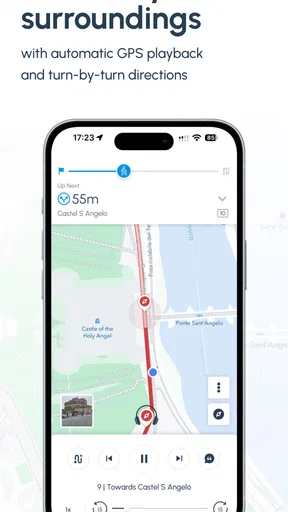
So, what makes VoiceMap stand out in a sea of travel apps? For starters, it offers a plethora of audio tours, each crafted by local storytellers, journalists, and tour guides. These aren’t just run-of-the-mill tours; they’re rich narratives that give you a feel for the place you’re exploring. The app uses GPS to guide you through each location, syncing the audio to your exact position. It’s like having a local friend walk alongside you, whispering secrets of the city you’d never find in a guidebook.
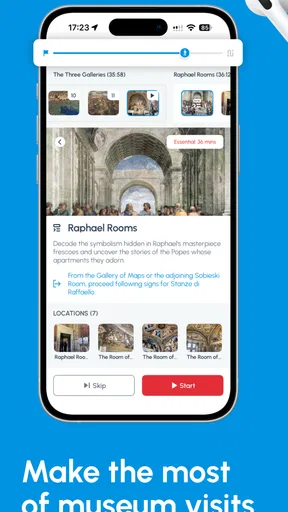
The range of tours is impressive. Whether you’re in New York City, Paris, or a less trodden path in a quaint village, VoiceMap has something for you. You can explore by category too, such as history, food, or nature. The audio quality is top-notch, and the narrators are engaging, making the experience immersive and enjoyable.
A practical way to use GPS narration
Location-triggered audio changes the rhythm of a walk: rather than staring at a map after every block, I can listen, look around, and let the route guide me. That works best when I keep one ear open to the street and pause at busy crossings or crowded spots. GPS is a helpful guide, not a substitute for paying attention to traffic, signs, or temporary closures. If the route takes me somewhere unfamiliar, I’d check the next turn while standing safely aside instead of trying to read the screen on the move.
Worth Reading Before You Choose

Flipboard Shows What News Apps Must Do Beyond the Feed

Switching to Android Auto Means Rethinking Your Driving Routine

Google Calendar Makes a Crowded Week Easier to Manage

Ludo King Makes the Most of the Minutes Between Plans

Baby Panda World Brings Quick Play to Modern Phones, but Its Game Library Feels Busy

ESPN’s Live Game View Makes Following Close Games Easier
There is also a useful trade-off between following the narration closely and taking spontaneous detours. A short stop for a shop or viewpoint can make the outing more personal, but wandering too far may separate me from the intended sequence. I’d pause the tour before exploring off-route, then resume once I’m ready to continue. That small habit helps keep the story and the physical route in sync without making the walk feel rigid.
Personal Experience: A Walk with History
I decided to try out a historical tour in my own city, just to see how well it worked. Let me tell you, it was like seeing the city through new eyes. As I followed the route, the app’s GPS feature worked seamlessly, guiding me without any hitches. The narrator’s voice was clear, and I learned fascinating tidbits about places I’d walked past a hundred times without a second glance. It was both enlightening and entertaining.
One of the best parts? You can pause the tour anytime, take a break, grab a coffee, or snap a few pictures. When you’re ready to resume, the app picks up right where you left off. This flexibility is a real game-changer, especially if you’re like me and enjoy taking your time to soak in the surroundings.
Planning around the phone, not just the route
A realistic use case is a free afternoon in a city I know only slightly: I choose a walk before leaving, download it while I have a dependable connection, bring headphones, and start near a convenient landmark. I can stop for lunch or a photo without turning the outing into a race. If I’m meeting someone later, I’d also check where the route ends so I can judge whether it leaves me near my next destination or requires extra travel time.
That preparation matters because an audio tour competes for attention with the place itself. Headphones can make narration easier to hear, but in a busy street I prefer a setup that lets me remain aware of people and vehicles around me. Families or groups may also want to consider whether everyone can comfortably hear one phone; this format is naturally easiest for a solo visitor or a pair who can share the listening experience.
Offline Mode: Never Miss a Beat
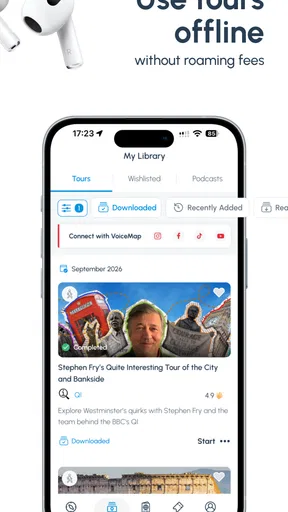
Another feature that deserves a shout-out is the offline mode. You can download tours in advance, which is perfect if you’re traveling to places with spotty internet connection. I tested this feature during a recent trip, and it worked flawlessly. No more worrying about data roaming charges or losing access in the middle of a tour.
What offline preparation can and cannot solve
Downloading ahead is especially useful when I expect weak reception, want to avoid relying on mobile data, or simply prefer not to troubleshoot while standing on a pavement. I’d do it before leaving accommodation or another reliable connection, then make sure the phone has enough battery for navigation and audio. Offline access reduces one source of travel friction, but it does not remove the need to keep the device charged or to follow the route safely.
For a trip with several possible tours, I would avoid downloading choices impulsively at the last minute. Picking the most likely route first keeps preparation simple and helps me avoid spending precious time browsing outdoors. If plans change, I can still decide whether another option is worth preparing, but the practical benefit comes from treating downloads as part of the day’s setup rather than a rescue step after connectivity has already become unreliable.
Where it fits beside maps and group tours
Compared with a standard map app, this is less about getting from any address to any other address and more about having a story attached to a planned route. Maps remain the better choice when I need live directions, public transport choices, or a quick way to change destinations. A scheduled human-led tour can be a better fit for someone who wants to ask questions, meet other travelers, or have a guide adapt the explanation in person. VoiceMap’s advantage is independence: I can begin on my own schedule and pause when the day calls for it.
That independence is not automatically best for everyone. A traveler who enjoys wandering without a route may find the guided sequence restrictive, while someone who wants deep conversation or tailored answers may prefer a person rather than recorded narration. I see it as a companion to those options, not a universal replacement. It is most rewarding when I want context and structure but still want to set my own pace.
Price, access, and the app’s current state
The app is free to install, with in-app purchases listed from $0.99 to $149.99 per item, so I would check the price of a specific tour before planning around it. That range makes it important not to assume every experience is included at no cost. The audience rating is Teen, and the app has a 4.5 average from around 1.7K ratings, with 255 written reviews. It has passed 100K installs, which suggests a substantial traveling audience, though popularity alone cannot tell me whether a particular route suits my interests.
Its current version is 15.0.0, while the app first appeared on February 22, 2015; it requires Android 7.0 or later. Those details show a product with a long history and a current version number, but they do not by themselves tell me what changed between releases. For someone already using it, the sensible takeaway is to check that the installed app is current before a trip and to prepare the chosen tour in advance, rather than expecting an update to change the character of the experience.
What I would check before relying on it
The main remaining question for any traveler is not whether the app covers a city, but whether its available tours fit the exact visit: route length, subject, starting point, and cost all affect whether one is practical. I would inspect those details before buying or setting aside a limited stretch of sightseeing time. If a tour does not line up with my interests or schedule, a regular map and a locally recommended place can be the better choice.
I would also keep expectations grounded about what GPS narration can do. It can provide context at relevant locations and help me follow a planned path, but it cannot guarantee that a street will be quiet, a site will be open, or a detour will suit my plans. The app works best when I treat it as a well-prepared walking companion and retain the freedom to stop, skip a section, or change direction.
Wrapping It Up
All in all, VoiceMap: Audio Tours & Guides is a fantastic companion for both seasoned travelers and casual explorers. It’s more than just an app; it’s a gateway to discovering hidden stories and seeing the world from a fresh perspective. Whether you’re exploring your hometown or venturing abroad, this app is a must-have in your travel toolkit.
So, next time you’re itching to explore, ditch the paper maps and let VoiceMap take you on an adventure. You won’t regret it!
Pros
- User-friendly interface for easy navigation.
- Wide range of tours in various cities.
- Offline mode available for travel convenience.
- High-quality audio with engaging narrators.
- GPS-triggered audio for seamless experience.
Cons
- Limited free content
- requires purchases.
- Some tours lack detailed information.
- Occasional GPS connectivity issues.
- Not available in all desired locations.
- Audio language options are limited.
FAQs for VoiceMap: Audio Tours & Guides
What is VoiceMap and how does it work?
VoiceMap is an audio tour app that provides immersive, location-aware experiences. It uses your device's GPS to play audio automatically at specific locations, offering stories and insights as you explore. The app includes tours created by locals and experts, enhancing your travel with personal narratives and historical insights.
Is VoiceMap available offline?
Yes, VoiceMap allows you to download tours for offline use. This feature is particularly useful for travelers who may not have reliable internet access during their explorations. Simply download the tour in advance, and the app will guide you using GPS without needing a data connection.
What kind of tours does VoiceMap offer?
VoiceMap offers a wide variety of tours, including historical walks, cultural explorations, and thematic tours like food and architecture. Created by locals, historians, and professional storytellers, these tours cover diverse interests and locations worldwide, ensuring there's something for every traveler.
How much does it cost to use VoiceMap?
VoiceMap is free to download, but individual tours may come with a cost. While some are free, others require a one-time purchase. Prices vary depending on the tour's length and content. This flexible pricing allows users to choose tours that fit their budget and interests.
Can I create my own tour on VoiceMap?
Yes, VoiceMap allows users to create their own audio tours. This feature is ideal for locals, historians, or anyone with a story to share about a specific location. The platform provides tools and support to guide you through the process of crafting and publishing your own guided experience.


